
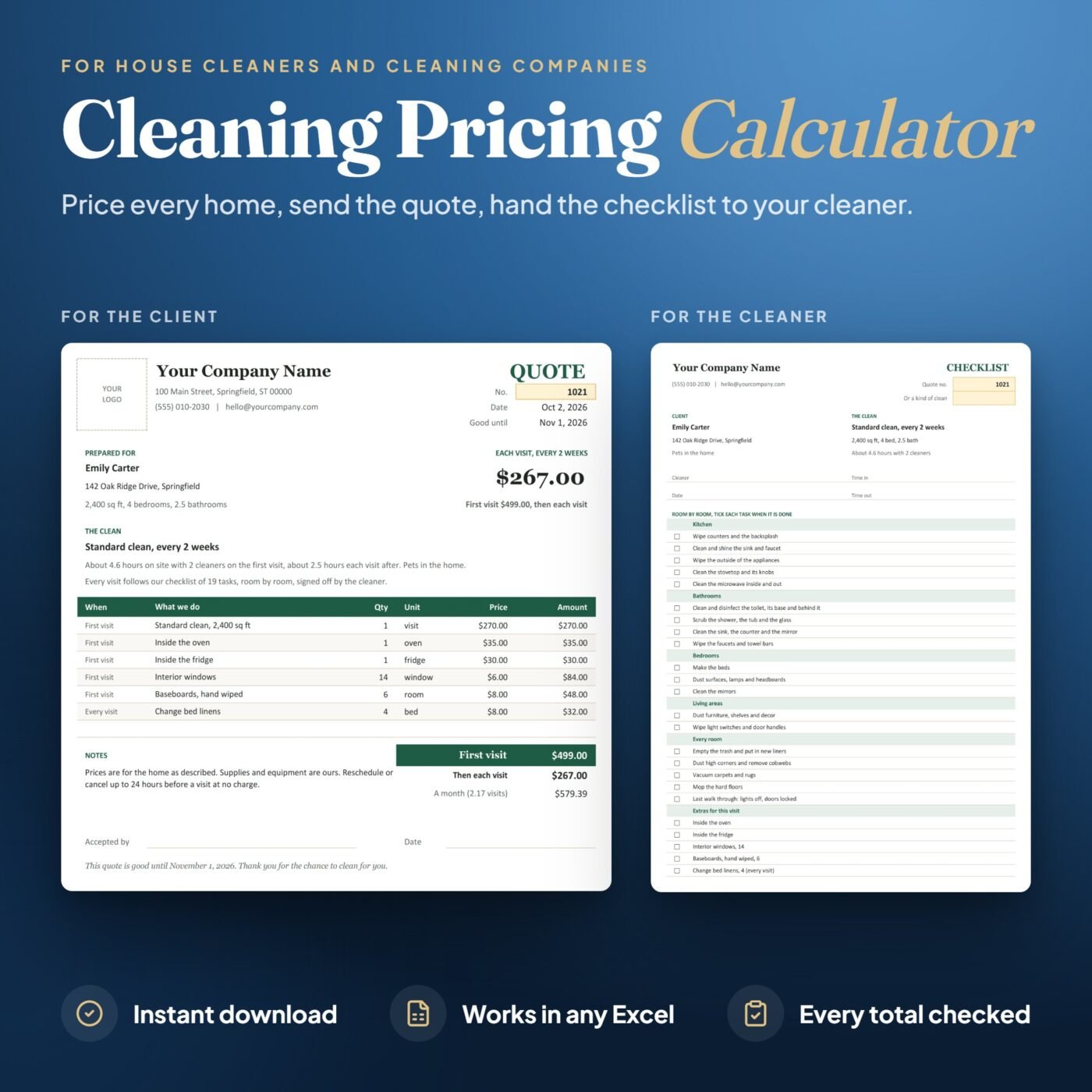
What it does
Type each home once: its square feet, bedrooms and bathrooms, how dirty it is, pets, how often and how many cleaners. The hours work themselves out, and so does a price that keeps your margin: the first visit, each visit after it and what the plan brings in a month. Add extras such as inside the oven or windows, once or every visit.
Pick a quote number and the Quote tab is a clean page for your client, ready to print or send. The Checklist turns the same quote into the room by room list for your cleaner, with a box to tick for each task and the quote’s extras at the end. The Dashboard shows quotes won, your win rate, the money a month from regular clients and what a cleaner hour really earns.
It is made for cleaners who want to stop guessing what to charge and to hand every client and every cleaner the same clear page.
A real example
- Standard clean, 2,400 sq ft
- $270.00
- 5 extras: oven, fridge, windows, baseboards, linens
- $229.00
- First visit
- $499.00
Quote 1021 in the file, as Excel works it out: a standard clean every 2 weeks of a 2,400 sq ft home with 4 bedrooms, 2.5 bathrooms and pets, two cleaners. Each visit after the first is $267.00, $579.39 a month, and a cleaner hour earns $49.60.

I run Forms and Sheets. If you have a question about this file, you can email me. Email Hamza
What is inside
| Section | What it does |
|---|---|
| Start Here | Six steps to get going, in plain words |
| Dashboard | Quotes won, win rate, money a month from regular clients, what a cleaner hour earns |
| Quote | The page for your client: the clean, the extras, the first visit and each visit after |
| Checklist | The room by room list for that clean, with its extras, for the cleaner to tick |
| Quotes | One row per home: size, rooms, condition, pets, how often; the hours and prices work out |
| Extras | Inside the oven, the fridge, windows, linens: once or every visit |
| Tasks | 45 cleaning tasks, room by room, for five kinds of clean |
| Settings | Your cleaner hour cost, margin, travel, lowest price, kinds of clean and extras |
Questions
Who is it for?
House cleaners, maid services and small cleaning companies, on your own or with a team, who quote homes, deep cleans, move-outs, Airbnb turnovers and small offices.
Do I need to know Excel formulas?
No. You only type in the yellow cells. The hours, the prices, the quote page, the checklist and the dashboard fill in by themselves, and the Start Here tab walks you through it.
How is the price worked out?
From the home itself. Its square feet divided by what one cleaner does in an hour, plus time for each bedroom and bathroom, times how dirty it is and pets. Those hours times what a cleaner hour costs you, plus supplies and travel, with the margin you aim for on top, rounded up to the next $5 and never under your lowest price. Every one of those numbers is yours to set in Settings.
Why is each visit cheaper than the first one?
A home cleaned every week or two takes less time each visit (Settings: 80% of the time weekly, 85% every 2 weeks, 90% every 4 weeks), so each visit after the first costs less. The first visit is priced as a one-time clean, as most cleaning companies do.
Can I use my own prices?
Yes. Type your own price per visit on Quotes and it is used instead. A price that earns less than your margin, or is under your lowest price, is flagged so you see it before you send it.
What are the checklists?
45 tasks room by room for five kinds of clean: standard, deep, move in or out, Airbnb turnover and office. Type a quote number on the Checklist and it shows that clean's tasks with the quote's extras at the end, a box to tick for each, and lines for the cleaner, the date and the times. Change, add or remove tasks on the Tasks tab.
Can I add extras like inside the oven or windows?
Yes. Ten extras are set up with their minutes and price (inside the oven, the fridge and the cabinets, windows, blinds, baseboards, laundry, linens, walls, the garage), and you can add your own. Each one goes on the first visit or on every visit.
How much does it hold?
Up to 200 quotes, 300 extras on them, 100 checklist tasks and 12 kinds of extra.
Do I have to delete the example before I start?
No. Your download has two files: the example, 26 quotes from July to October, so you can see how it works, and a blank copy of the same workbook with the settings and the 45 tasks ready for your own quotes.
How do I get the file after I pay?
You get the download link on the screen right after checkout, and in your email receipt.