What it does
Log each payment you get on the Income tab, each business expense on Expenses and each trip on Mileage. The category decides the Schedule C line, meals count at 50%, and a part-personal bill counts at its business share. Miles get the IRS rate for the day you drove.
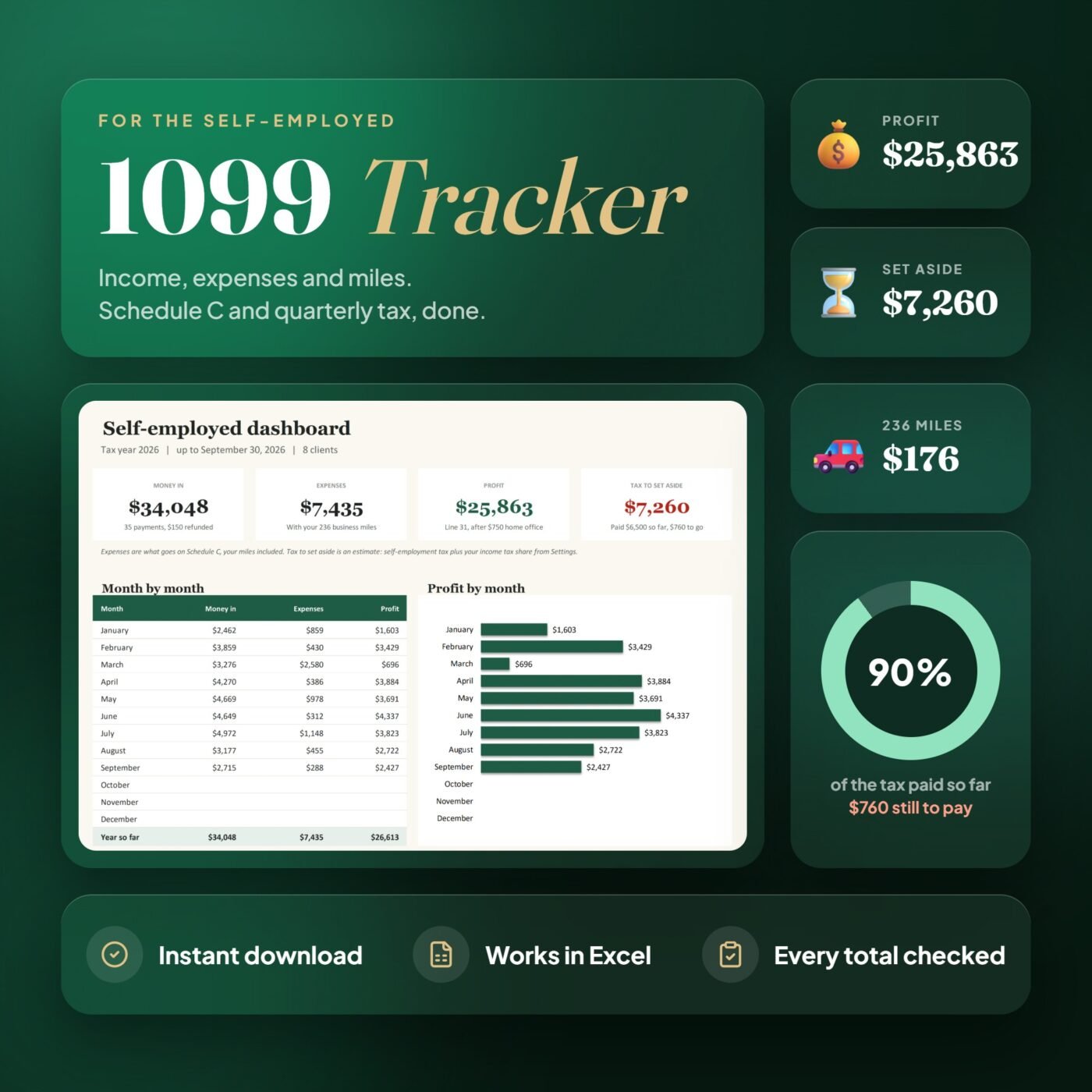
The Schedule C tab adds up lines 1 to 31, home office included. The Quarterly Tax tab works out what to set aside for each estimated payment and tracks what you paid, and Clients shows who paid you what and which 1099 to expect. The Dashboard shows money in, expenses and profit by month.
It is made for freelancers, independent contractors and side hustlers who keep their own books and file Schedule C.
A real example
- Gross income, line 7
- $34,048.00
- Expenses, line 28
- $7,434.96
- Home office, line 30
- $750.00
- Net profit, line 31
- $25,863.04
- Self-employment tax
- $3,654.33
- Income tax share (15%)
- $3,605.38
A freelance designer's year in the file, up to September 30, 2026, as Excel works it out. To set aside for tax so far: $7,259.71.

I run Forms and Sheets. If you have a question about this file, you can email me. Email Hamza
What is inside
| Section | What it does |
|---|---|
| Start Here | Six steps to get going, in plain words |
| Dashboard | Money in, expenses and profit by month, biggest costs, best clients |
| Income | One line per payment, refunds you give too |
| Expenses | One line per expense, each on its Schedule C line |
| Mileage | Each trip at the IRS rate for its date |
| Schedule C | Lines 1 to 31, home office included |
| Quarterly Tax | What to set aside for each estimated payment, and what you paid |
| Clients | What each client paid and which 1099 to expect |
| Settings | Tax year, income tax share, home office, mileage rates and categories |
Questions
Who is it for?
Freelancers, independent contractors, consultants, creatives and side hustlers who get 1099s or are paid through apps, and file Schedule C as a sole proprietor or single-member LLC.
Do I need to know Excel formulas?
No. You only type in the yellow cells. Schedule C, the quarterly tax set-aside, the 1099 check and the dashboard fill in by themselves, and the Start Here tab walks you through it.
Which Schedule C lines does it fill?
Lines 1 to 7 from your income, every expense line from 8 to 27b from your categories, line 9 with your miles, and lines 28 to 31, with line 30 for a home office by the simplified method. You can add your own categories in Settings.
How is mileage worked out?
You type the miles of each trip. The IRS rate for the date you drove is used: in 2026, 72.5 cents a mile to June 30 and 76 cents from July 1, both already in Settings. Parking and tolls go on line 9 too.
How does the quarterly tax part work?
It works out self-employment tax (15.3% on 92.35% of your profit, the 12.4% part up to the Social Security wage base) plus the share of profit you set aside for income tax in Settings, for each estimated payment due April 15, June 15, September 15 and January 15. Log what you pay and it shows what is still due. It is an estimate to plan with, not tax advice.
Which 1099 should I expect?
The Clients tab adds up what each client paid you. A client who paid you $2,000 or more directly in 2026 should send a 1099-NEC; payments through an app or card come on the app's 1099-K. Type the amount on each 1099 you get and it shows any difference from your records.
How much does it hold?
Up to 400 payments, 600 expenses, 200 trips and 50 clients in a year. One file per tax year: next January, start a fresh copy of the blank file.
Do I have to delete the example before I start?
No. Your download has two files: the example, a freelance designer's January to September, so you can see how it works, and a blank copy of the same workbook for your own year.
How do I get the file after I pay?
You get the download link on the screen right after checkout, and in your email receipt.