What it does
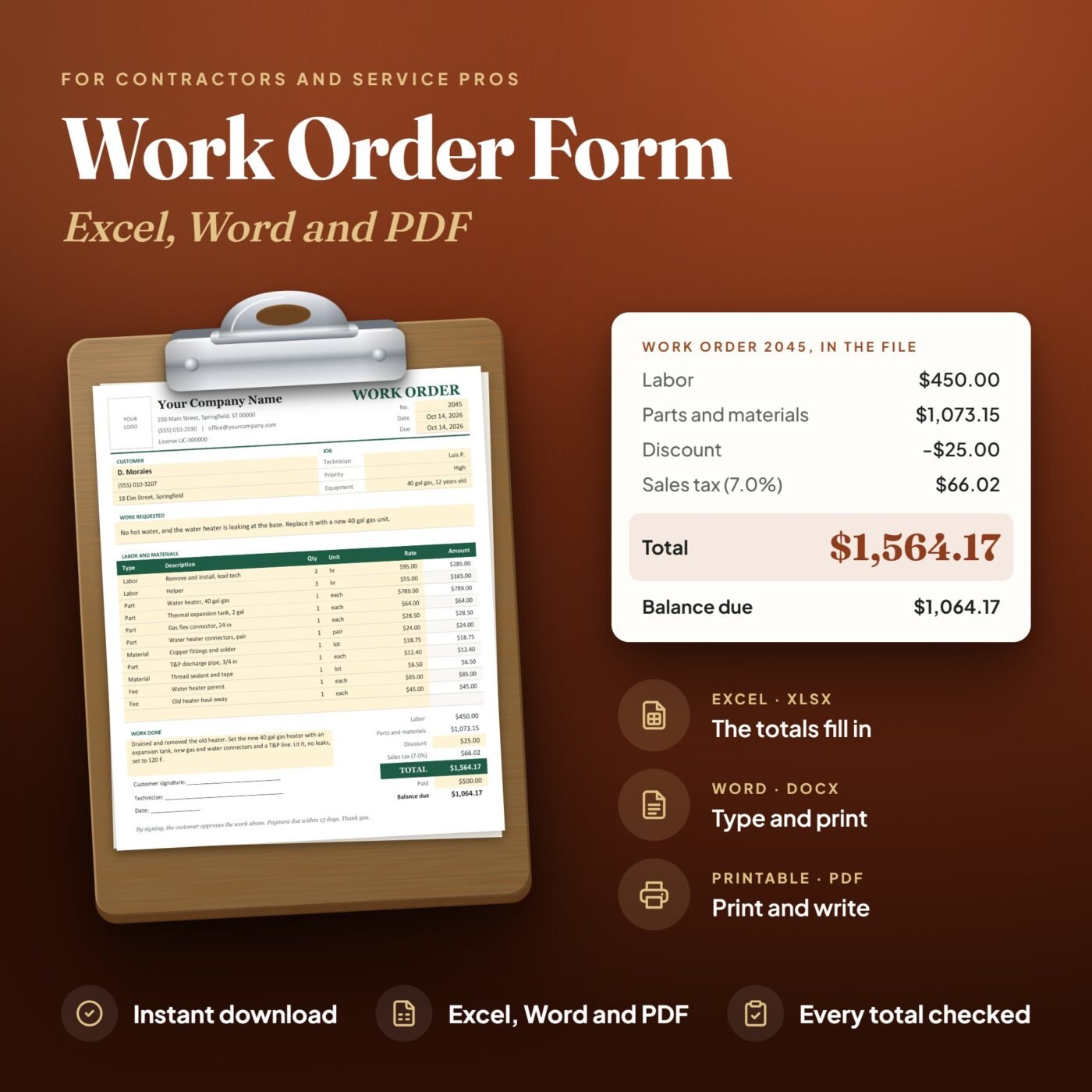
Type the customer, the job and what was asked for, then one line per labor or part: type, quantity, unit and rate. The form works out every amount, the labor and parts subtotals, the discount, sales tax, the total, the deposit paid and the balance due.
Sales tax follows each line’s type, set once in Settings, so parts and materials are taxed and labor only if your state taxes it. The work order prints on one letter page, with the work done, the customer’s signature, the technician and the date.
The download has the Excel form with a worked example, a blank copy, a Word copy to type in and a printable PDF for writing by hand in the van.
A real example
- Labor
- $450.00
- Parts and materials
- $1,073.15
- Discount
- -$25.00
- Sales tax (7.0%)
- $66.02
- Total
- $1,564.17
- Paid
- $500.00
- Balance due
- $1,064.17
Work order 2045 in the file, a 40 gal gas water heater swap with 11 lines, as Excel works it out.

I run Forms and Sheets. If you have a question about this file, you can email me. Email Hamza
What is inside
| Section | What it does |
|---|---|
| Start Here | Four steps to get going, in plain words |
| Work Order | The form itself: customer, job, labor and parts lines, totals and signatures |
| Settings | Your business, sales tax, payment terms and which kinds of line are taxed |
| Word copy | The same form to type in Word |
| Printable PDF | The blank form to print and fill in by hand |
Questions
Who is it for?
Plumbers, HVAC and electrical techs, handymen, appliance and auto repair shops, anyone who writes up a job for a customer to sign.
What is in the download?
Four files: the Excel form with a worked example, a blank Excel copy, a Word copy to type in, and a printable PDF to fill in by hand.
What does the Excel form work out?
Each line's amount (quantity times rate), labor and parts subtotals, the discount, sales tax, the total, what was paid and the balance due.
How does sales tax work?
Each line has a type: labor, part, material, equipment or fee. In Settings you say which types are taxed and your rate. Labor is taxed only if you switch that on, for the states that tax it.
How many lines does it hold?
12 lines of labor and parts on one letter page, with the work done, the totals and the signatures under them.
How do I start the next job?
Right-click the Work Order tab, Move or Copy, Create a copy, or save the file under a new name for each job. The blank copy is ready for your first one.
Can I put my logo on it?
Yes. In Excel or Word, Insert, Pictures, and place it over the YOUR LOGO box.
Does the Word copy add up the totals?
No, Word cannot do sums in a table by itself: you type the amounts there. The Excel form is the one that adds everything up.
Do I need to know Excel formulas?
No. You only type in the yellow cells. Everything else works itself out, and the Start Here tab walks you through it.
How do I get the file after I pay?
You get the download link on the screen right after checkout, and in your email receipt.