What it does
Book Plan is a calm book tracker app that opens in the web browser on your phone and your computer. Nothing to install from an app store and no account: your books stay on your device.
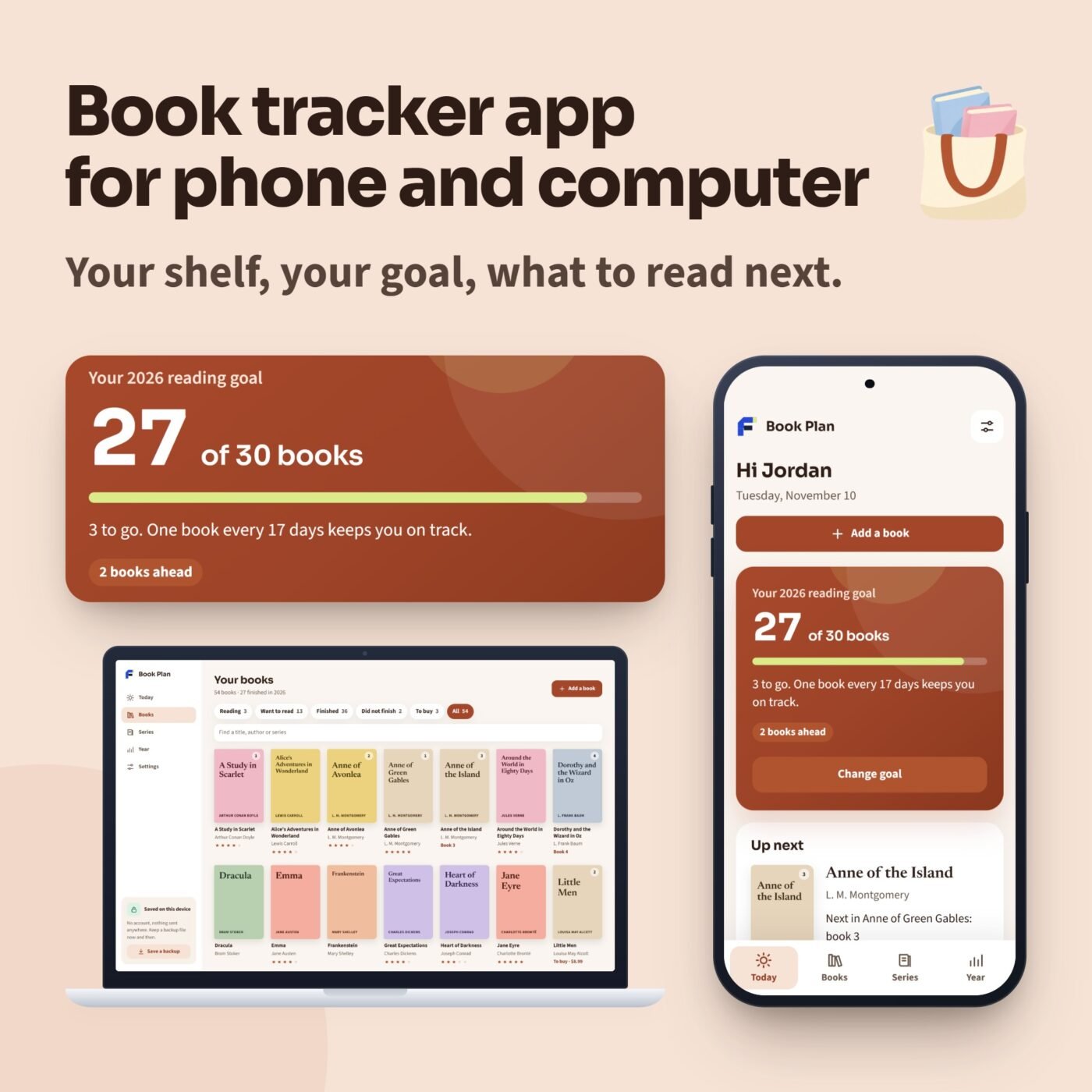
Every book gets a cover the moment you add it, made from its title and author, so even a library of hundreds of books looks like a shelf. Bring your whole Goodreads or StoryGraph library in at once: titles, authors, series, stars, pages and the dates you read come with it. Your reading goal keeps the pace in plain words: ahead, on track or a little behind, and one book every so many days. Say where you are in a book and Book Plan works out the days left at your own pace. Up next is picked by plain rules: a library book due back, the next book of a series, then the one waiting longest. Every series stays in order, every reading day can be changed, and the Year screen shows your year in books.
After you buy, the Start Here guide gives you your private link and a code to scan with your phone’s camera. Add Book Plan to your Home Screen and it opens without internet after the first visit. An offline copy for computers is included. Save a backup file now and then to keep your books safe or move them to another device.
Try it first: the free demo opens every screen with the example books. Nothing you type in the demo is kept.
A real example
- Books this year
- 27 of 30
- The pace
- 2 books ahead
- One book every
- 17 days
The app opens with a fictional example, Jordan's reading life, built around the day you open it: 54 books, 36 finished, 3 being read, 13 to read and 2 given up, with series, a library book and a lent book. Every title is a classic in the public domain.

I run Forms and Sheets. If you have a question about this file, you can email me. Email Hamza
What is inside
| Section | What it does |
|---|---|
| Today | Your reading goal and its pace, the book to read next and why, where you are in every book with the days left, library books due back and books you lent |
| Books | Your shelf as covers, one made for every book; filters, a search, and every book with its stars, notes, quotes and reading days |
| Series | Every series in order with its covers, read out of the total, and the next book ready to start |
| Year | Your year in books: books, pages, hours listened, stars, books by month, your favourite and more |
| Settings | Your goal, Goodreads and StoryGraph import, a spreadsheet of your books and your backup file |
Questions
How do I get the app?
After you buy, download the Start Here guide. It has your private link and a code to scan with your phone's camera.
Does it work on iPhone and Android?
It opens in the web browser. Add it to your Home Screen from Safari on an iPhone or Chrome on Android, then open it from its icon. After the first visit it works without internet.
Can I bring my books from Goodreads or StoryGraph?
Yes. Save your library as a file there and pick it in Settings. Titles, authors, series, stars, pages and the dates you read come with it, and every book gets a cover.
Can I use it on my phone and my computer?
Yes. Each device keeps its own list. Save a backup file on one and load it on the other to move your books.
Do I need an account?
No. There is nothing to sign in to and nothing is sent anywhere: your books stay on your device.
Is there a subscription?
No. You pay once.
Can I try it first?
Yes. The free demo opens every screen with the example books. Nothing you type in the demo is kept.
What if I clear my browser?
Clearing your browsing data removes the books on that device. Save a backup file now and then and load it back when you need it.
Which browsers does it work in?
It is made for current Chrome, Edge, Safari and Firefox, and was checked in Google Chrome and in Safari's engine at phone and computer sizes.
Where do the covers come from?
Book Plan makes a cover for every book from its title and author, in calm colours. Nothing is fetched from the internet, so it works offline.