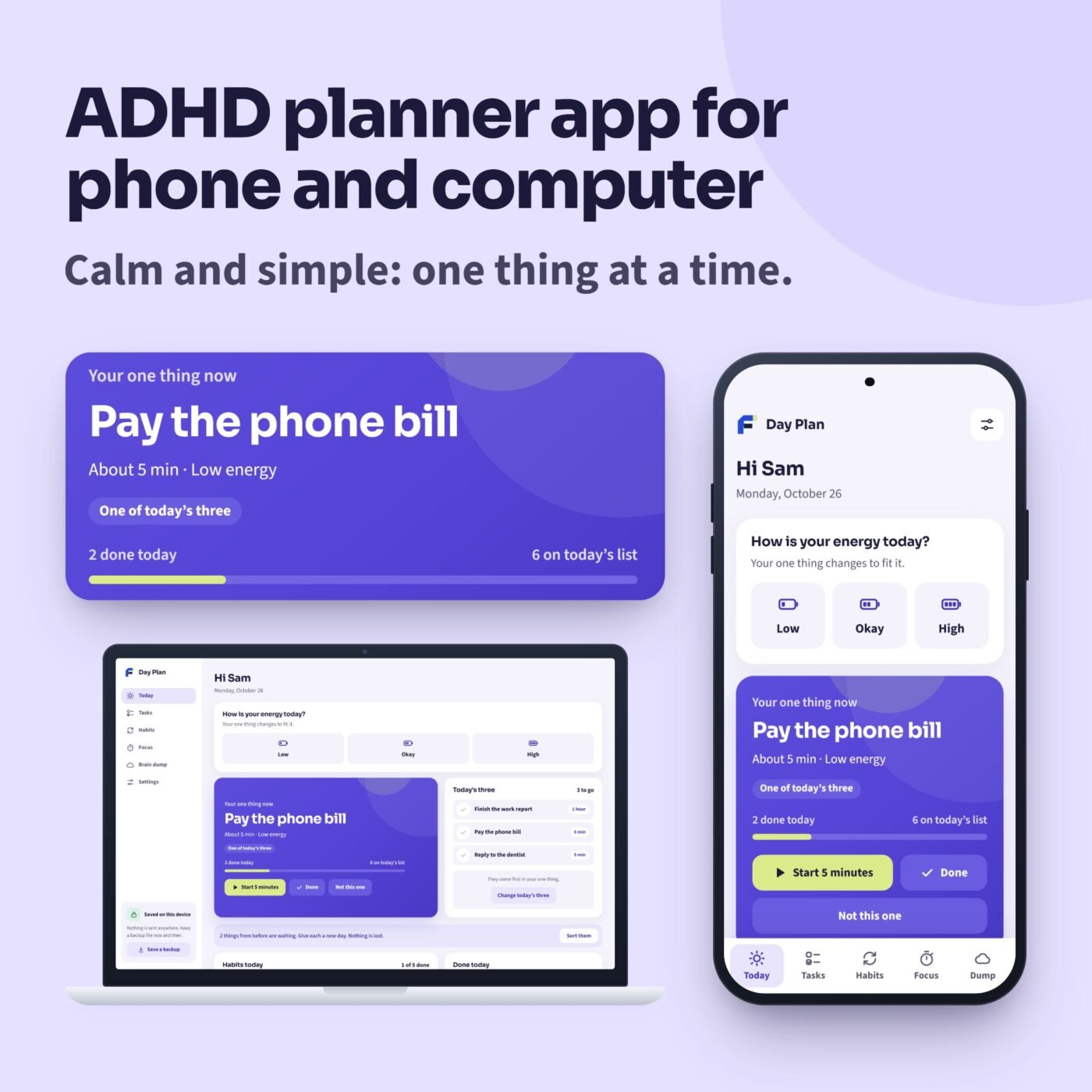
What it does
Day Plan is a calm ADHD planner that opens in the web browser on your phone and your computer. Nothing to install from an app store, no account and no sign-in: what you add stays on your device.
Tap how your energy is today and Today shows your one thing now: today’s three come first, then what fits your energy, then the shortest. Big tasks get small steps, one at a time. Tasks are planned a day at a time, Later keeps the rest out of sight, and anything from before waits kindly for a new day. Habits allow a rest day, routines run one step at a time, and the month fills in as you go. A focus timer you can watch runs from 5 to 25 minutes, and a brain dump takes every thought, to sort one at a time later.
After you buy, the Start Here guide gives you your private link and a code to scan with your phone’s camera. Add Day Plan to your Home Screen and it opens without internet after the first visit. An offline copy for computers is included. Save a backup file now and then to keep your plan safe or move it to another device.
Try it first: the free demo opens every screen with the example plan. Nothing you type in the demo is kept.
A real example
- Your one thing now
- Pay the phone bill
- Habits this month
- 24 days with a tick
- Focus in the last 7 days
- 2 h 47 min
The app opens with a fictional example, Sam's week, built around the day you open it: 21 tasks, 5 habits (2 of them routines), a week of focus times and 6 thoughts in the brain dump.

I run Forms and Sheets. If you have a question about this file, you can email me. Email Hamza
What is inside
| Section | What it does |
|---|---|
| Today | How your energy is, your one thing now, today's three, habits for today and what is done |
| Tasks | A day at a time, the next 7 days, Later out of sight, and a kind catch-up for anything from before |
| Habits | Habits and routines you run one step at a time, days a week with a rest day, a month that fills in |
| Focus | A timer you watch run down, 5 to 25 minutes, a place to park a thought, minutes of focus a day |
| Brain dump | Empty your head, one thought per line, then sort them one at a time |
| Settings | Your name, the day your week starts, the timer's sound and your backup file |
Questions
How do I get the app?
After you buy, download the Start Here guide. It has your private link and a code to scan with your phone's camera.
Does it work on iPhone and Android?
It opens in the web browser. Add it to your Home Screen from Safari on an iPhone or Chrome on Android, then open it from its icon. After the first visit it works without internet.
Do I need an account?
No. What you add stays on your device. Nothing is sent anywhere.
Can I use it on my phone and my computer?
Yes. Each device keeps its own plan. Save a backup file on one and load it on the other to move your plan.
What if I clear my browser?
Clearing your browsing data removes the plan on that device. Save a backup file now and then and load it back when you need it.
Is there a subscription?
No. You pay once.
Can I try it first?
Yes. The free demo opens every screen with the example plan. Nothing you type in the demo is kept.
Does it send reminders?
No. Add it to your Home Screen so it is one tap away: it opens on your one thing now.
Which browsers does it work in?
It is made for current Chrome, Edge, Safari and Firefox, and was checked in Google Chrome on Windows at phone and computer sizes.
Is this medical advice?
No. Day Plan is a planner that helps you organise your day.